
Guest list nominations
'Guest List FINAL_v3.xlsx' is back in your inbox for the third time this week. The fix isn't a better spreadsheet, it's not sharing one at all.
Key Takeaways
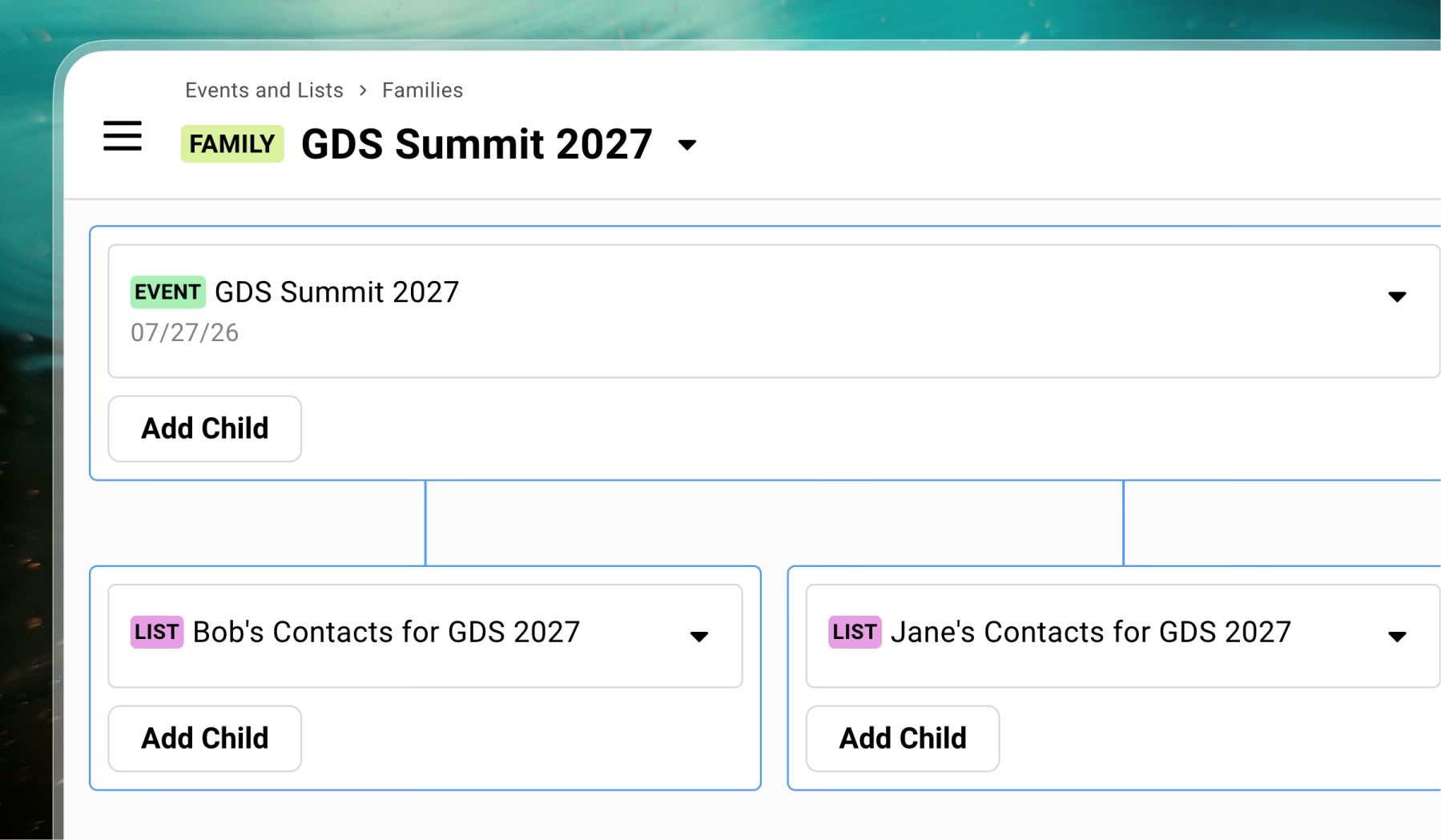
- Each teammate can work from their own private nomination list, with contacts rolling up automatically to one event instead of everyone editing the same shared tab
- Lists are sources, the event is the destination; contacts sync upward only
- External collaborators see only the one list you gave them, not your contacts, your team, or your other events
- Nothing here means an automatic invite, you still decide
Guest List FINAL_v3.xlsx is back in your inbox. Third time this week.
Nobody’s sure which tab is the real one anymore. Someone deleted a row and nobody noticed until the guest showed up unannounced.
And, your boss doesn’t want his contact visible to the rest of the team, but that’s exactly how a shared tab works, everyone sees everything.
The spreadsheet isn’t the problem. Spreadsheets are flexible, portable, easy to send. The problem is what happens the moment more than one person needs to touch the same one.
The version-control problem, not a formatting problem
Every team that’s built a guest list with more than one contributor hits the same wall. Somebody’s edit silently overwrites somebody else’s.
There’s no real record of what used to be there… By the end of the week you’re reconciling versions instead of running an event.
And, the visibility problem sits right next to it.
A shared tab means shared visibility. There’s no way to let a partner add their own contacts without also handing them everyone else’s.
Lists as sources, the event as destination
The fix isn’t a smarter spreadsheet. It’s not sharing one spreadsheet at all.
Give each teammate their own list, a private space just for their contacts, and set your event as where those lists roll up to.
Bob adds his contacts to Bob’s list. Jane adds hers to Jane’s. Both show up on your event’s guest list automatically, tagged by where they came from, with duplicates resolved to one entry instead of two.
The framing worth keeping: lists are sources (children), the event is the destination (parent).
Contacts sync upward, from list to event, never sideways between one teammate’s list and another’s.
Bob never sees Jane’s list. Neither of them sees your other events. You keep the full picture. They keep exactly the slice that’s theirs.
Add them as an external collaborator and that’s the whole boundary. No access to your contacts, no team settings, no visibility into anything beyond the one list you handed them.
The trade-off
There’s some downsides here. It’s a new login for someone who was perfectly happy attaching a file to an email.
It’s a new screen to learn… And, your partner or your boss may not want to bother.
So, weigh it against what the spreadsheet actually costs you: a week of reconciling versions, a contact exposed to people who shouldn’t have seen it, a nomination that quietly disappeared because someone’s edit didn’t save.
Ten unfamiliar minutes from your partner, against that, is a good trade.
The edge case worth knowing before it happens
Say a teammate nominates someone you don’t actually want at the dinner. You’ve got two options, and they behave very differently.
Delete them from the event, and they disappear from every list that fed into it too. That’s necessary, otherwise they’d just sync right back up the next time the list resyncs. But it means your teammate’s nomination just vanished with no explanation, and there’s a real chance they notice the gap and add the person right back.
Mark them rejected instead. You can filter that status off the guest list you’re actually working from.
Jane still sees her nomination sitting there. She just never finds out you passed on it. Nobody’s guessing why someone disappeared, and nobody’s re-adding a person you already decided not to invite.
Neither move is permanent by accident. If you remove someone who shouldn’t have been removed, Restore Guests brings them back.
One thing to try
Pick your next event with more than one contributor to the guest list. Create a private list for each of them, point it at your event using Parent/Child/Family functionality, and send a two-line ask: add the people you want here.
Watch what comes back land in one place, deduplicated, without a single version-controlled spreadsheet changing hands.
Frequently Asked Questions
How do I let multiple people contribute to one guest list without sharing a spreadsheet?
Give each teammate their own list in Gatsby and set your event as its destination (parent). Whoever they add to their list rolls up automatically, duplicates resolve to one entry, and nobody sees anyone else's list. You get one clean guest list without a single shared tab.
Can external collaborators add guests without seeing my other contacts?
Yes. Add them as an external collaborator to your team and then assign them a list you create for them. They see that list and nothing else, not your contacts, not your team settings, not your other events. They can add or edit their own nominations and that's the whole surface.
What happens if I delete someone a teammate nominated?
Removing a guest from the event removes them from every list that fed into it (every child list), since otherwise they'd just sync back up. If you don't want that, mark them rejected instead. Rejected can keep them out of your filtered views without the nominating teammate seeing the pick vanish and re-adding it.
Is a removed guest gone for good?
No. Restore Guests brings back anyone removed by mistake. Nothing here is a hard delete.
The Shortlist Monthly
For teams whose guest list is a shortlist
Once a month we send the best of what we published, one email, from the team at Gatsby.