
Overview
SMS Consent & Compliance
How Gatsby handles STOP, HELP, and BLOCK, what your guests see, where consent is recorded, and what you're confirming the first time your organization sends a text.
Text messaging is regulated. Email isn’t.
Mobile carriers audit the numbers that send texts, and they can shut one off. Texting people who never agreed to hear from you doesn’t just annoy a guest, it puts the channel itself at risk. The rules below aren’t Gatsby being cautious. They’re the conditions under which texting keeps working.
Every opt-out, automatically
STOP, HELP, and BLOCK replies are processed without you doing anything, and opted-out guests are filtered out of your sends.
Disclosure built in
Your organization’s name and the opt-out keywords are added to every text Gatsby sends. A guest’s first text also carries the message-and-data-rates line.
A record you can point at
Every consent change is stored with its source and timestamp.
The three keywords
Section titled “The three keywords”Every text Gatsby sends carries the same footer: Reply STOP to opt out, HELP for help, BLOCK to mute this host. Here’s what each one does.
STOP stops all Gatsby event texts
A guest who replies STOP (or END, QUIT, UNSUBSCRIBE, CANCEL) stops receiving Gatsby event texts completely. That includes any texts they happen to get through Gatsby from an organization other than yours.
That’s not a Gatsby choice. STOP is handled by the carrier, not by us, and it blocks the number the message came from rather than the organization that sent it. Gatsby couldn’t deliver your text to that guest even if it wanted to.
The only way back is the guest texting START. No web page, no organizer action, and no re-import can lift it.
BLOCK stops your texts only
BLOCK (or MUTE) is Gatsby’s own keyword, and it’s the narrower of the two. A guest who texts BLOCK stops hearing from your organization. Nothing else about their texts changes.
Unlike STOP, a BLOCK can be undone. Only the guest can do it, though, in the preference center. There’s no SMS keyword that lifts one, and you can’t clear it for them. Gatsby’s reply to the guest confirms which organization the BLOCK applied to.
HELP explains what's going on
HELP (or INFO, SUPPORT, ASSIST) returns a short transactional reply: who sent the text, where to get help, and how to opt out. It doesn’t stop anything.
Keyword replies are handled automatically and never reach your inbox. A guest who texts something that isn’t a keyword gets a one-time pointer to the SMS help page instead of silence. Gatsby’s short code isn’t a two-way conversation channel.
The preference center
Section titled “The preference center”Every Gatsby text points at a self-serve page where a guest can manage who may text them, without signing in to anything.
How a guest gets in
They enter their phone number, Gatsby texts them a six-digit code, and they enter it. No account, no password, and no personal link, so the same address works from any message they’ve received.
The code is good for ten minutes. Making a second change means requesting a new one.
What they see
A master switch for all Gatsby event texts, and below it one toggle for each organization that has actually texted them. Organizations that have never messaged that number don’t appear.
Turning the master switch off is the same as texting STOP. Turning a single organization off is the same as texting BLOCK for that one.
Getting back a globally opted-out guest
Only the guest can do it, and only by texting START. If they turn the master switch off on the web, the page tells them so. This is the one recovery path Gatsby genuinely cannot offer from a web page. The carrier is enforcing it, not us.
Consent on the guest list
Section titled “Consent on the guest list”Every guest with a phone number carries a consent state you can read from the guest list, the contacts table, and the contact profile.
The three states
Opted in. An explicit opt-in on record, or your organization has texted them and they haven’t opted out.
Opted out. They won’t receive your texts. Gatsby filters them out of every campaign and reminder automatically, so there’s nothing for you to do about it.
No preference. No signal either way. These guests are still sendable.
Unsupported
Shown in place of the consent state when the number isn’t a valid US number. Consent is beside the point, because Gatsby’s short code can’t deliver there.
Why 'No preference' guests can still be texted
Because you’ve already vouched for them. Before your organization’s first text, Gatsby asks you to confirm that the people you’re texting have a relationship with you and agreed to hear from you. That confirmation is the basis for texting a guest who has no recorded preference, and it puts the responsibility for that judgment with you, where the relationship actually is.
It fits how Gatsby is used: invitations, RSVP links, and reminders to your own guest list, not cold marketing to a purchased one. Keep it to people who would recognize your name, and the assumption holds.
Gatsby enforces the other half. Anyone who has opted out is filtered from every send, and no attestation overrides that.
Organizers can't set a guest's consent
The consent column is read-only everywhere it appears. An organizer asserting a guest’s consent on their behalf wouldn’t be consent.
Capturing an explicit opt-in at RSVP
Section titled “Capturing an explicit opt-in at RSVP”There’s a dedicated survey question that records a real opt-in, with a source and a timestamp, when a guest registers.
Adding it to a survey
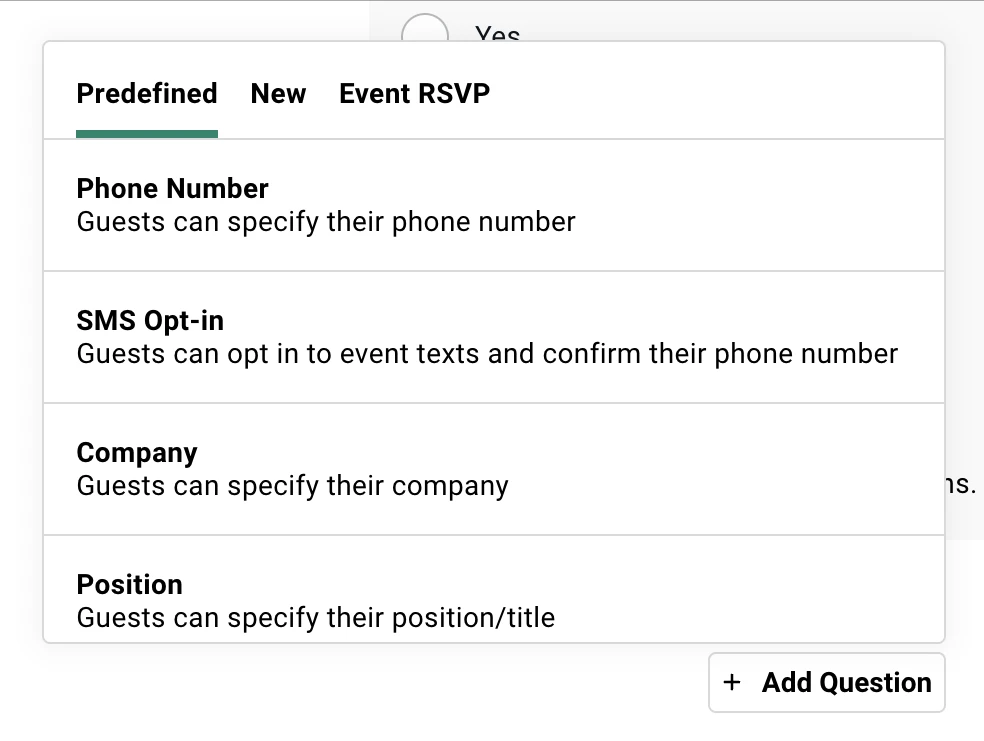
In the survey builder, under Registration on the event, the SMS opt-in question sits in the Predefined tab. One per survey. See Forms and Surveys for building the rest of it. It renders as a fixed consent checkbox plus a phone field, so a guest who has no number on file can supply one.
The wording of the checkbox and its disclosure line are fixed. You can’t edit consent language.
How it behaves
The phone field is locked to US numbers. If a guest ticks the box and leaves the phone empty, the survey won’t submit.
The question can never be marked required. A forced consent isn’t consent, so the Required toggle excludes this type.
An unticked box records nothing. It means no answer, not no, and it never revokes an existing opt-in.
Who is shown it
Gatsby hides the question from guests where asking would be pointless or unwelcome:
| The guest | Sees it? |
|---|---|
| Has already opted in to your texts | No |
| You’ve already texted them, and they haven’t opted out | No |
| Opted out of all Gatsby texts (texted STOP) | No |
| Blocked your organization specifically | Yes, this is their way back |
| Has a phone, never texted, no preference recorded | Yes |
| Has no phone on file | Yes |
| A plus-one, or anyone on a public registration link | Yes |
The confirmation text
A guest who opts in gets one confirmation text, but only when it’s meaningful. If your organization has already texted them, they don’t get another. If the opt-in lifts a previous block, they always do, so a re-subscribe is never silent.
Where the confirmation is the first text a number has ever had from Gatsby, it carries the full program disclosure.
Where the answer shows up
As a read-only label in the guest list, contacts, seating, and hosted tables, showing the answer to that question on that survey. The consent column described above is the authoritative view, and it reads correctly whether or not the event asked the question.
Common Questions
Section titled “Common Questions” A guest says they opted out but is still getting texts from another firm. Why?
Because BLOCK only stops the organization it was aimed at, while STOP stops everything. If they want it all to stop, they reply STOP to any Gatsby message.
Can I re-subscribe a guest myself?
No. Consent has to come from the guest. Their routes back are texting START (for a global opt-out), the preference center, or ticking the SMS opt-in question on a future registration.
Do email unsubscribes affect SMS?
No. They’re separate lists. Someone who unsubscribed from your emails can still receive your texts, and vice versa.
Does the SMS Auto-Reminder follow the same rules?
All of them. STOP and BLOCK both stop it, it carries the same footer and disclosure, and it re-checks consent at the moment it fires.
What happens if a number is disconnected or a carrier reports it as unsubscribed?
Gatsby records the failure against that recipient on the campaign, and where the carrier signals an opt-out, it’s written into the consent record so future sends skip the number.
Where can I point a guest who's asking about a text they got?
Send them to gatsby.events/sms-help. It explains in plain English what Gatsby is, why they received a text, who sent it, and how to stop or manage it. It’s the same address the SMS replies point at.