
The badge is the only thing every guest reads
Most teams print a name on it. The leverage is in everything else they could have printed.
Key Takeaways
- The badge is the most-read object at every event; it can do more than just identify people
- One extra field per guest (tenure, goal, first-timer flag) changes how conversations start
- Always opt-in; guests should choose what appears publicly on their badge
- Printing badges on-site allows you to move quick
There’s exactly one piece of paper at your event that every guest looks at more than once.
It gets glanced at across rooms, read once at introduction, and checked again when someone’s name slips.
The badge is the most-read object in the building.
Name, company, maybe a title. That’s the average badge in 2026, and it’s been the average.
Maybe don’t be average?
What a name and a title can’t do
A name on a badge tells you who someone is. It does not tell you whether the conversation you’re about to start is the one they’re hoping for.
That’s the gap the rest of the badge is for.
A few fields I’ve seen quietly change how a room works:
- “LP since 2019” on the badge of a returning investor. The host doesn’t have to introduce them as a long-time supporter. The badge already does it. Conversations skip the throat-clearing.
- “Looking for: a Series B lead” on a founder’s badge at a curated dinner. A wanted poster, basically, in the most flattering sense. Someone two drinks in knows exactly which table to drift toward.
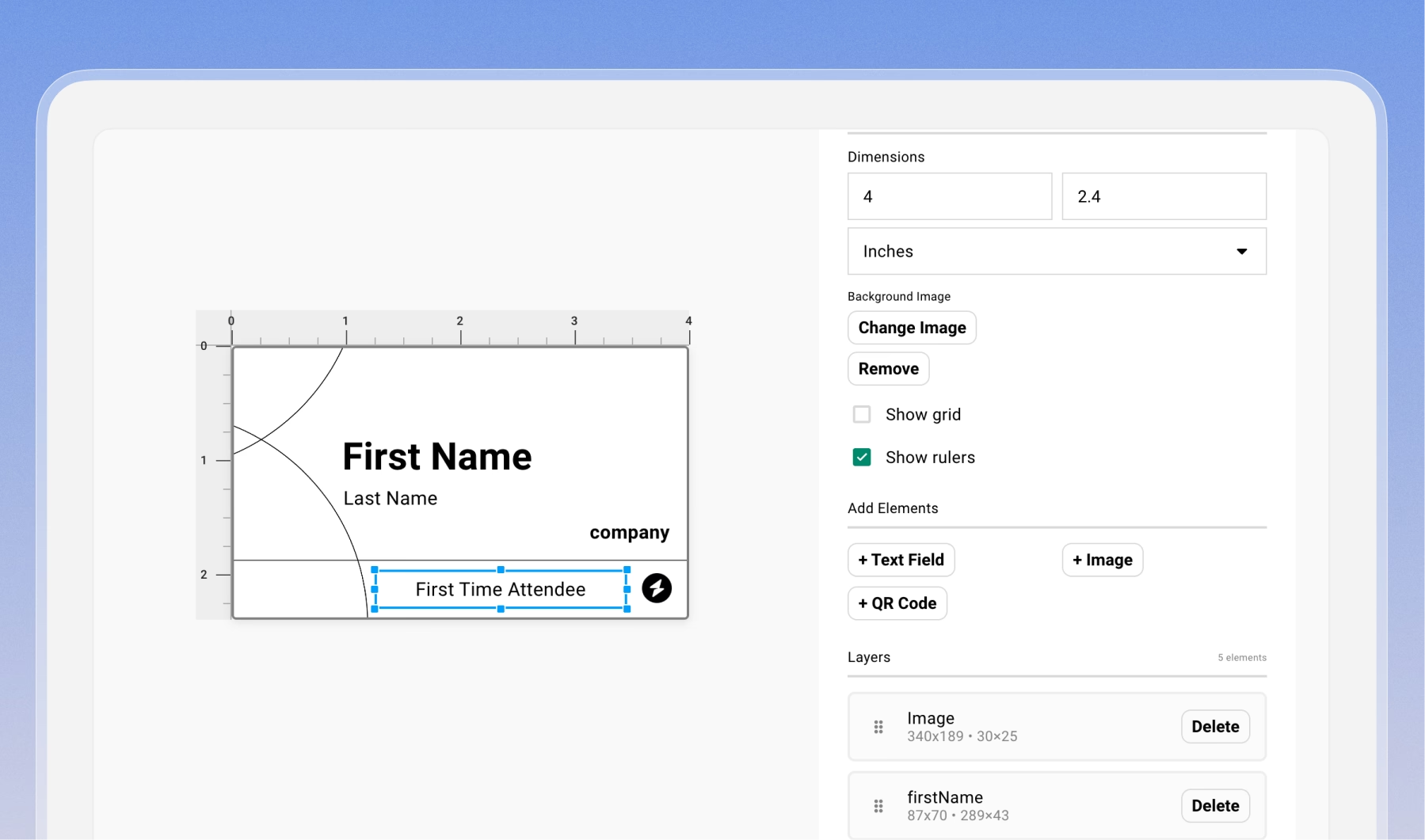
- “First time” in small text under the company name. Now your hosts have a job. Walk the first-timers around, introduce them to two people each. The badge tells you who.
- “Engineering” set larger than the first name at an internal team offsite. The point of a team offsite is not to learn names. It’s to find the person from the team you’ve been emailing for six months and put a face to them.
Each one does work that introductions cannot do at scale.
You don’t have a host with you all night. You have a badge.
The badge is a public commitment
The reason this works is the same reason it can fail badly when done lazily.
A badge is read. It’s the most public document a guest carries. Putting “Looking for: a co-founder” on someone’s chest commits them to that conversation.
Some guests will love it. Others will find it presumptuous and will spend the night flipping the lanyard backwards.
Both reactions are real.
The wrong field on the wrong chest is worse than no field at all. “Looking for: a job” pinned to a guest at a dinner that their employer is also attending. “First time” on someone the host just introduced as a long-time supporter. Either kills the room faster than a blank tag would.
So the rule is opt-in, surfaced clearly at registration. Not buried. Not “we’ll pull it from the CRM and surprise them.”
If a guest is going to wear it in public, they should have been the one to put it there.
Where it gets fiddly
A badge is a printing project, and printing projects have edges.
If you’re using a thermal printer, your design language is black ink on white tape. No gradients. No light gray dividers. Anything subtle dies in the rasterization.
If you want color and texture, you need a Zebra printer and you need to pre-print the card stock with everything except the variable fields.
A field that lives on your Gatsby contact as a multi-select won’t pull onto a printed badge directly either.
“Company stage” might be a dropdown with Seed, Series A, Series B in your data model. To get it on the badge, export it, create a parallel [Badge] Company Stage text field, and re-import as plain text to that field.
But, in Gatsby this is where the friction collapses.
Custom fields live on the contact profile, and the badge designer pulls them through directly. Add the field to the badge once.
Anyone whose profile has it filled in gets the line; anyone without it gets a clean badge.
Registration forms and post-RSVP surveys can write back to those same fields, so the next event starts with more data than the last one did.
The check-in devices sync from the same source, which means if you change the design ten minutes before doors, every iPad has it.
What this is really about
A curated event is a room where the guest list is the product.
The badge is one of the few operational surfaces every guest touches for the full length of the event. The interesting question isn’t whether to put a name on it. Everyone does.
The question is what else the badge can carry.
Think about who’s in the room, what they want, what kind of conversation the host is hoping for… things that the host can’t carry on their own.
What to try this week
For your next event, write down one fact about each guest that isn’t their name or their company. Their fund, their team, the year they joined, what they’re looking for, whether they’re new.
At thirty guests you can do this in a spreadsheet. At two hundred the field has to already live somewhere: the contact record, the survey response, the CRM. Or, the experiment dies on the data step.
That’s the unglamorous part of this becoming a habit instead of a stunt.
Print it. Walk the room. See what conversation the badge starts that wouldn’t have started otherwise.
Frequently Asked Questions
What should I put on an event badge besides name and company?
One field that reflects what the guest is there for. Good options are "LP since [year]" for a returning investor, a goal line like "seeking a Series B lead" for a founder, or "First time" to flag new attendees for your hosts. Think about how you can shortcut a conversation or flag someone for a host.
Can thermal printers print gradients or color on event badges?
No. Thermal printers are black ink on white stock. Things like gradients, light gray dividers, and anything subtle gets lost in the rasterization. If you want color or texture, use a Zebra printer with pre-printed card stock.
Should guests choose what goes on their badge?
Always. A badge is the most public document a guest carries for the full length of the event, so anything on it should be something they put there themselves. Surface the option clearly at registration.
The Shortlist Monthly
For teams whose guest list is a shortlist
Once a month we send the best of what we published, one email, from the team at Gatsby.