
Your co-host knows the room. You just can't see it.
Your co-host already knows which guests should meet and which should stay apart. Getting that out of their head takes one editable field, not another call.
Key Takeaways
- Left alone, a co-hosted room could split in two; each host clusters with their own people and the introductions that justified combining the lists might never get made
- The hosts might already know who should meet whom; the bottleneck is getting that judgment out of their head
- An editable field on a shared guest list view can collect each host's seating notes async, with no login required
- The highest-value note is usually who to keep apart, and people will only tell you that in writing
- Color-coding the seating chart by relationship owner shows whether the two networks are actually mixed before anyone walks in
A co-hosted dinner is two guest lists neither of you could have filled alone. Left alone, it stays two guest lists.
Your host drifts toward the people they already know. Their guests follow. Your co-host does the same on the other side of the room.
Two hours later everyone’s had a nice time, and you’ve run two separate dinners at one table.
The one introduction that justified combining the lists never got made. It didn’t fail. It just never came up.
The judgment lives in a head you can’t see into
The people running these rooms are already very good at this.
A partner, an executive hosting a dinner, a dean seating a donor table. Hand them the guest list and they’ll tell you in ninety seconds which five pairings matter and which two people should sit at opposite ends of the table.
So they can do this. What they can’t do is climb inside their own head and hand you the map. The judgment is in there. You, the person actually building the event, are out here.
Worse, half the room belongs to your co-host. Their judgment lives in their head, at another firm, on a calendar you don’t control.
The reflex is to schedule a call. Get both hosts on a Zoom, walk the list, take notes. That works, when you can get it on the calendar. Across two firms and two busy people who are already doing you a favor, “let’s find thirty minutes” is the thing that quietly doesn’t happen. Then you’re seating twenty-four people off your own half-guesses.
Five sentences beat the call
Add one text column to your guest list. Call it a seat brief. Then share the guest list as a view: a link, no login, opens on a phone, showing only the columns you pick. Turn on editing for that one field.
Send it to your co-host with a small, specific ask. Not “let’s sync on seating.” Just: who are the five people you most want taken care of, and can you leave me a sentence on each?
What comes back is the good stuff, written at 11pm from their phone whenever it was convenient, sitting on your live guest list instead of dying in a Slack thread.
Five sentences is a smaller ask than a meeting and a sharper input than one. People are more precise in writing. They think before they type, and they’ll give you the thing they’d never say out loud on a group call.
The most useful note is who to keep apart
Ask any host for their pairings and you’ll get the warm ones first. Seat the two founders solving the same problem from different sides. Put the new member next to the person who pulls everyone in.
Those are real. They’re also the ones you’d half-guess correctly on your own.
The judgment you can’t reconstruct is the negative space. The two people who used to work together and didn’t part well. The founder and the investor who already passed on them. The competitor you’d have seated three chairs down because nothing on the guest list told you they compete.
None of that shows up in the data. It only lives in the head of someone who knows both people, and it almost never surfaces on a call, because saying “keep these two apart” out loud to a room feels like gossip. In a text field at 11pm, it’s just a note. That single sentence saves an evening more often than any pairing you’ll make.
The chart is where you catch it before the door
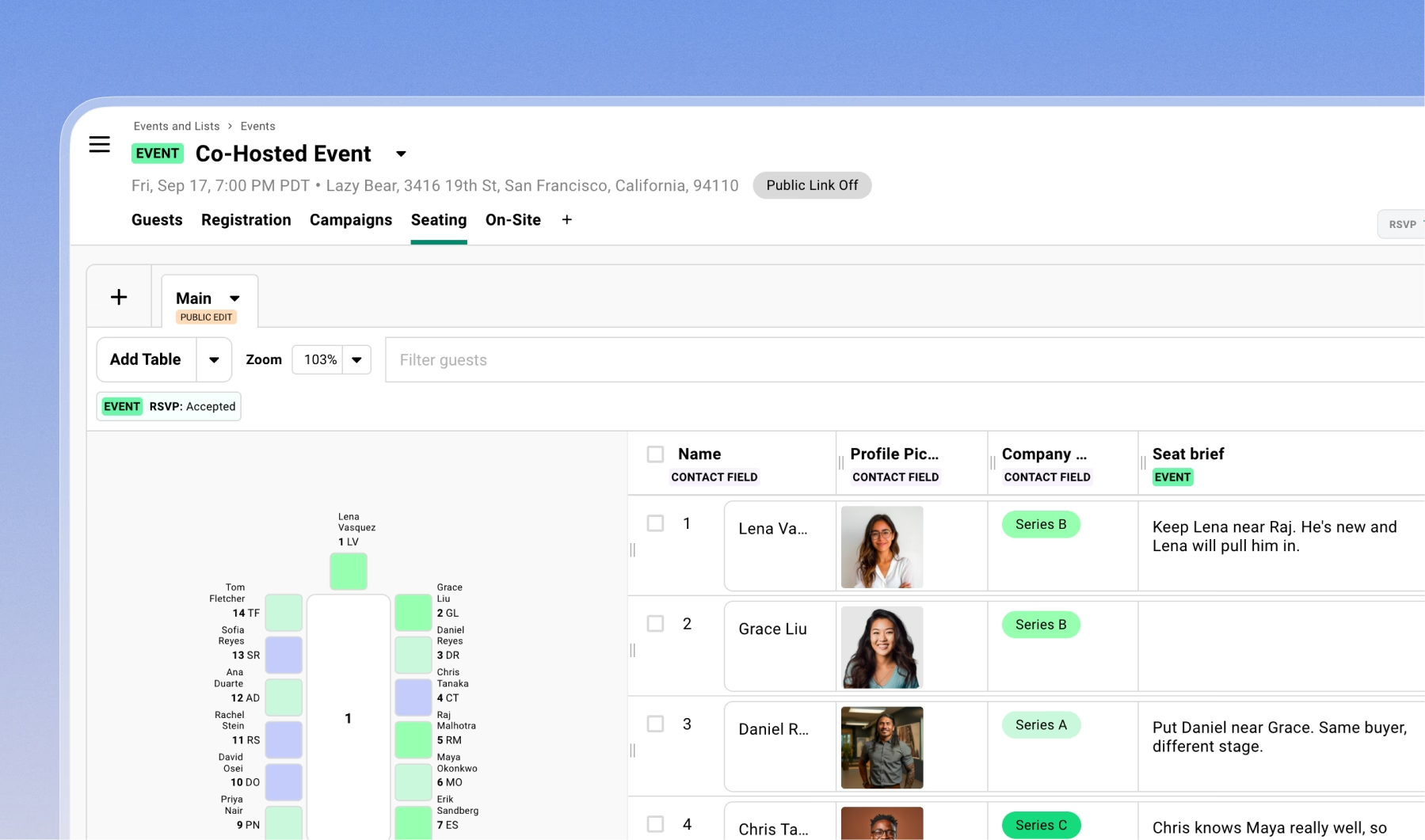
Open the seating chart and add the seat brief as a column, right next to the tables. As you drag someone to a seat, the reason they’re there is sitting beside their name. You’re not seating from memory or flipping back to a doc.
Then color the chart by relationship owner. The failure mode shows up instantly: one table all your host’s people, the next all your co-host’s, and you’ve drawn two dinners again. Rebalance until every table carries both colors. No spreadsheet shows you that, and a call about it would take twenty minutes and still leave you unsure.
One thing you’ll hit: you can only color by one field at a time. If you want to check the mix on two dimensions, say relationship owner and company stage, build the chart, duplicate it, and recolor the copy. Same seats, two views, and you can confirm both before you lock it.
How far to take this
You can go a lot further than five sentences. Pull in what each guest sells, who they want to reach, and what they need next, and you’re close to a real matchmaking brief.
The honest line: climb that effort curve only when matching is the entire point of the room and you can keep the data fresh. A founder summit built around who-meets-whom earns it. A recurring quarterly with the same fifteen faces does not, and stale data is worse than none. For most dinners, five sentences per host is the floor, and the floor is usually enough.
Be careful how you collect the richer stuff, too. Pre-filling a guest’s details from your CRM saves them typing, but lead with too much and it reads like you’ve been keeping a file on them. Ask instead. A light “we’ve added a couple of questions to help with introductions” note a week out, after the RSVP, gets you honest answers without piling friction onto the sign-up.
One thing to try
Take the next co-hosted event on your calendar. Add one text column called seat brief, share the guest list as an editable view, and ask each host for their five most important people, a sentence on each, and anyone to keep apart.
Build the first pass of the chart from what comes back, before you’ve had a single call about it.
Then notice that none of this was really about co-hosting. Your own team walks in just as blind. The partner working the room, the account owner who’s been emailing a guest for six months, the person at check-in who’d greet someone differently if they knew they flew in from Tokyo that morning. Same move: get what’s in one head into a place the rest of the team can act on.
Frequently Asked Questions
How do I get a co-host's seating input without a meeting?
Add a text field to your guest list, share the list as a view with editing turned on for that one field, and send the link. Your co-host adds notes on their own time, no login required, and everything saves to your live guest list.
Can a co-host edit a shared guest list without a Gatsby account?
Yes. A shared view is read-only by default, but you can enable editing on specific fields. Anyone with the link can then edit just those fields from a browser, without logging in.
How do I make sure a co-hosted event's two guest lists actually mix?
Color-code the seating chart by relationship owner. Tables that are all one color mean one host's guests are clustered together, so rebalance until every table has both. To check a second dimension like company stage, duplicate the chart and recolor the copy.
The Shortlist Monthly
For teams whose guest list is a shortlist
Once a month we send the best of what we published, one email, from the team at Gatsby.